
How the My Plan Manager client portal makes the NDIS easier

My Plan Manager’s client portal is a better way to stay on top of your National Disability Insurance Scheme (NDIS) plan’s budget, just like it is for Linda and Adrian.
Adrian said that when he first started helping his sister Linda to manage her life, he struggled because he not only had to learn the NDIS, but all of the agencies that help her.
He knew there would be invoices coming in every day.
“I thought there’s no way I can juggle both of those things. So when someone told me about My Plan Manager, I went Yes Please!”.
He realised that if someone could help him manage the invoices, it would help him learn more about the NDIS.
Which freed up his time to learn more about what they can provide to support his sister.
Watch the video below to see Linda and Adrian's story:
Adrian said that when he knew he had a portal that showed him how {Linda’s} budget was going, and ‘little doughnuts’ showing how much {she’d} spent in each area, it helped him monitor and track his sister’s NDIS plan budget, and see how things were going.
“I actually thought that one day I’ll take the invoices back {from My Plan Manager} and start managing {her budget}, but now that it’s managed so well, maybe not!”
The My Plan Manager client portal helps you or your carer stay on top of your NDIS plan’s budget, to get the most out of the NDIS.
Here's a quick video that shows how the portal works:
In a snapshot
The My Plan Manager client portal is simple to use and offers real time information about your budgets and invoice payments.
It lets you view support categories and support areas:
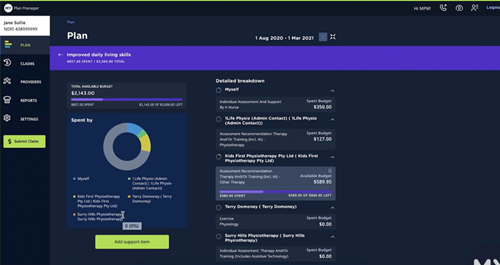
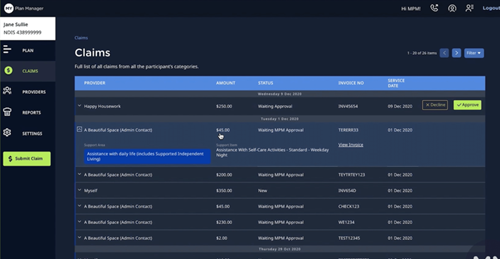
You can even add support items, and check the details of all past and current claims and get copies of invoices:
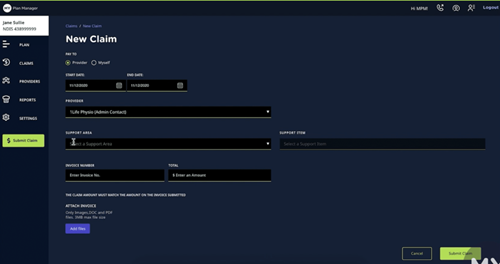
And you can forward new invoices to My Plan Manager through the client portal simply by starting a new claim. As soon as they’re approved for payment you’ll see your budget updated:
The client portal is not only accessible but has the latest security features to protect your private information.
Sign up to My Plan Manager to unlock client portal access, remove time-consuming admin and have invoices processed seamlessly.
Recent posts
18 February 2026
28 January 2026
26 January 2026
29 September 2025
You may also like...
 How My Plan Manager protects you from NDIS fraud and what you can do tooAs Australia’s largest plan manager, protecting your data and your National Disability Insurance Scheme (NDIS) funding is our top priority.
 My Plan Manager’s client portal: take control of your NDIS spendingWe have a handy piece of tech that puts you in control of your dollars – and your days! We explain all the best features of our client portal here.
 My Plan Manager's provider portal - NDIS claims made easyYou’re a provider in the National Disability Insurance Scheme (NDIS). You’re supporting a client and we’re their plan manager. You’ve scoped out their supports, you’ve signed off on a service agreement, and you’ve started putting your expertise to work. So, when the supports have been delivered and it comes time…
 Our client portal putting you in the driver's seatOur client portal is a powerful tool that puts you in the driver’s seat of your NDIS journey.